Case study, 2026
WitnessAI
WitnessAI is a local-first macOS meeting recorder with a compact native HUD for recording, live notes, and project time: no meeting bot and no required cloud recording.
macOS app · public download follows the current build pass
SwiftUI build, isolated demo state
Problem
Most meeting assistants announce a bot, upload audio, and split the useful context across another cloud dashboard. I wanted the note without adding another participant or surrendering the recording.
Solution
A native macOS app captures microphone and system audio as separate tracks, transcribes on-device, separates speakers, and files a searchable note. A compact Recording, Notes, and Clock HUD keeps the work around the call in one surface.
Impact
The working build records real calls on my Mac and produces speaker-aware transcripts. A public macOS download comes after the current reliability and packaging pass.
Product tour
See how WitnessAI stays beside the work.
A guided browser facsimile of the native macOS HUD, followed by authentic SwiftUI captures from the build.
Scripted walkthrough
01 · Capture
Keep the conversation in reach
The native HUD stays small enough to live beside the work without becoming the work.
Audio is browser-generated from the visible script. WitnessAI is not listening.
Privacy boundary
This simulation never requests microphone or system-audio access. It captures, uploads, and saves nothing.
Browser simulation
Drag the handle or use its arrow keys
Synthetic transcript
00:18
Josh
The public site should show proof, not just make claims.
Actual native build
Authentic SwiftUI captures
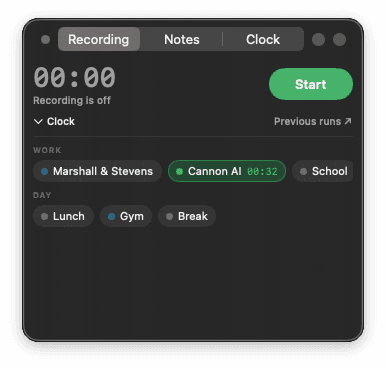
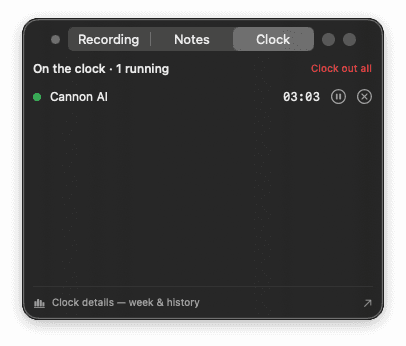
These screens come from an isolated demo state. Their project names and timers are synthetic.
Build notes
- Swift
- SwiftUI
- Core Audio
- Python
- whisper.cpp
- sherpa-onnx
- Vision OCR
The constraint
The useful version had to disappear into the work. It could not add a bot to the call, depend on one conferencing platform, or turn every recording into a new cloud copy.
That pushed the architecture toward the Mac itself. WitnessAI taps system audio and the microphone as two distinct tracks. The split matters: “me” versus “the call” is known at capture time instead of guessed later.
What the app does
- Detects a call and captures both sides without joining it.
- Runs transcription locally with
whisper.cpp. - Separates people in the remote track and can associate a voice with a person.
- Files the title, transcript, decisions, and action items into a plain local folder.
- Reads upcoming calendar context and prepares a short brief before the next meeting.
The current interface
The floating HUD now has three native surfaces: Recording, Notes, and Clock. Recording keeps the capture state obvious. Notes gives the live conversation somewhere useful to land. Clock lets me assign the surrounding work to a project without opening a separate time tracker.
The screenshots on this page come from the current SwiftUI build. They were rendered against isolated synthetic state with automatic recording and meeting detection disabled, so no real meetings, notes, names, or clock history appear in the public asset.
The browser interaction below is a product tour, not a web recorder. It uses scripted demo content, asks for no microphone or screen-sharing permission, and sends nothing anywhere.
The privacy boundary
Audio capture, transcription, speaker separation, and voice identification happen on the Mac.
Recording consent varies by jurisdiction. WitnessAI keeps a visible recording indicator, and users remain responsible for notifying participants and following applicable law.
Summaries are a separate, explicit choice. They can run through a local Ollama model, an already-configured coding-agent CLI, an API key, or not run at all. If no model is configured, the recording and transcript still complete. The app should make that boundary visible instead of hiding it behind a generic “private AI” claim.
The reliability lesson
The hardest failure was silent.
macOS can deny system-audio capture while the recorder continues to return a valid-looking, empty track. For weeks, the app could record my microphone perfectly and report success while the other side was flat.
The installer now proves capture instead of trusting permission state: it plays a tone, records the result, and checks that the recorder actually heard it. A diagnostic command can repeat that test at any time. That small proof step matters more than another setup screen.
Current state
The app is in active development and used against real meetings on my own Mac. The next pass is about reliability, packaging, and a public download that does not ask someone else to reproduce my development environment.
The code and download stay private until that pass is ready. The case study is public now because the architecture and the mistakes are already useful.